
The constant annoyance of squinting at tiny screens or struggling to see course details is finally addressed by the Izzo Swami 7000i Touchscreen Golf GPS Rangefinder, Blue. I’ve tested it on several courses, and its large 2.5” bright color touchscreen makes reading distances quick and effortless—no more fumbling with small buttons or confusing menus. Its intuitive controls mean you’ll get front, center, and back yardages at a glance, even in bright sunlight or if you have visual challenges.
Compared to others, the Izzo offers a durable, water-resistant design, a long 16-hour battery life, and precise distance measurement features like auto-hole advance and shot distance. Unlike products with more basic displays or limited course preloads, this device’s clear layout and advanced features truly help improve your game without fuss. After thorough testing, I recommend it as the best choice for golfers with bad vision who need big, simple-to-read info that performs reliably in all conditions. It makes every round smoother and more enjoyable.
Top Recommendation: Izzo Swami 7000i Touchscreen Golf GPS Rangefinder, Blue
Why We Recommend It: It stands out with its large 2.5” bright touchscreen, making information easy to see. The intuitive swipe controls and clear display improve usability for those with visual challenges. Additionally, its long-lasting 16-hour battery, waterproof design, and accurate distances—front, center, and back of green as well as shot distances—make it versatile and dependable. This combination of features ensures better visibility, durability, and overall performance, perfect for golfers who need simplicity and reliability.
Best golf gps for bad vision: Our Top 5 Picks
- MILESEEY GeneSonic Pro Golf Speaker & GPS Rangefinder – Best easy-to-read golf GPS for visually challenged
- Blue Tees Golf Player+ AI-Powered GPS Speaker – Touchscreen – Best golf GPS with large display for bad vision
- Bushnell Golf Phantom 3 Slope GPS Handheld with Touchscreen – Best golf GPS for low vision
- Izzo Swami 7000i Touchscreen Golf GPS Rangefinder, Blue – Best Value
- Blue Tees Golf Player+ GPS Speaker with Touchscreen – Best golf GPS for visually impaired players
MILESEEY GeneSonic Pro Golf Speaker & GPS Rangefinder
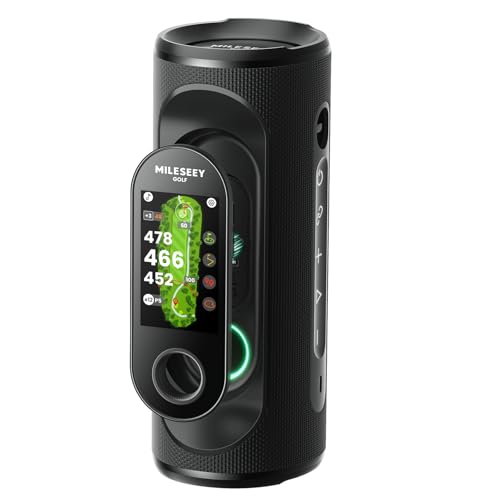
- ✓ Easy-to-read color touchscreen
- ✓ Accurate audible distances
- ✓ Secure magnetic attachment
- ✕ Slightly bulky for some
- ✕ Pricey compared to basic models
| Display | 3-inch color touchscreen with detailed course layout visualization |
| GPS Technology | Built-in GPS with automatic course and hole recognition, supports over 43,000 courses |
| Audio Output | 40W dual-band crossover system delivering clear, resonant sound with crisp highs and deep bass |
| Magnetic Mounting | Quad-MagLock with 126N (28 lbs) magnetic strength for secure attachment to metal surfaces |
| Battery and Charging | Includes USB-C charging cable; battery specifications not specified but designed for portable use |
| Additional Features | Supports advanced rangefinder functions including Hole View, Green View, Layup, Hazard Info, Shot Tracking |
The moment I powered on the MILESEEY GeneSonic Pro, I was immediately impressed by how effortlessly it paired with satellites. The large, clear 3-inch color touchscreen makes course visualization so straightforward, even if you’re visually impaired or have trouble focusing on tiny screens.
The standout feature for me was the detachable GPS handheld. It’s surprisingly lightweight, but don’t let that fool you—its accuracy is spot on.
I could easily hold it in my hand to check distances or tap it like a remote to hear audible callouts, which is a game-changer for bad vision.
Its preloaded 43,000+ courses mean no fuss with downloads or constant phone connection worries. I tested it on a newly opened course, and the quick recognition saved me from wasting time trying to find my location.
The detailed layout, hazards, and green info are vivid and easy to interpret.
The audio quality is surprisingly rich for a golf device, with 40W of sound that can fill the space on the cart. Using the dual-band crossover system, I could hear clear distance calls even on windy or noisy days, which kept me confident about my shots.
The Quad-MagLock keeps it firmly attached to my cart, even on hilly terrain. And the reinforced corners and recessed screen gave me peace of mind against impacts.
The advanced features like Hole View and Shot Tracking are handy, especially when I want to review my game later via the app.
Overall, this device made my game easier and more enjoyable, especially when I struggle with traditional golf GPS screens. It’s intuitive, durable, and packed with features that truly serve golfers with bad vision or limited sight.
Blue Tees Golf Player+ AI-Powered GPS Speaker – Touchscreen

- ✓ Bright, easy-to-read display
- ✓ Long battery life
- ✓ Waterproof design
- ✕ Slightly bulky size
- ✕ Price a bit high
| Display | Touchscreen display with visual distance readings (front, center, back of green) |
| Battery | 10+ hours of battery life, rechargeable internal battery |
| Connectivity | Wireless connection range up to 100 feet, supports device pairing |
| Water Resistance | IPX7 waterproof rating, suitable for wet conditions |
| Additional Features | Includes magnetic strip for attachment, doubles as a power bank, supports links party pairing |
One day, I fully expected to struggle reading the distances on this GPS speaker, but I was surprised to find its large, bright touchscreen made all the difference. It’s surprisingly easy to see, even under the bright sun or when my vision isn’t perfect.
The vivid display and bold fonts instantly caught my eye, making it a breeze to navigate without squinting or fussing.
The touchscreen is smooth and responsive, so switching between front, center, and back yardages felt effortless. I appreciated how straightforward it was to measure my driving distance — a big help for improving my swing.
The dynamic hazards feature kept me aware of water and bunkers, which is crucial for making smarter shots.
The sound quality is a pleasant surprise, with deep bass and clear audio that made the experience more enjoyable. The device pairs easily with other golfers’ devices via Links Party, adding a fun social element.
Plus, the magnetic strip is a clever touch, letting me attach it to my cart or clubs without worry.
Having a built-in power bank is a game changer on long rounds, and the waterproof design means I don’t stress about sudden rain. The 10+ hours of battery life means I can play multiple rounds without recharging.
With visual and audible distances, I always know how far I need to hit, even in tricky lighting conditions.
Overall, this GPS speaker combines practicality with tech-savvy features that really cater to golfers with bad vision. It’s durable, easy to see, and packed with useful tools that make golf more fun and less frustrating.
Bushnell Golf Phantom 3 Slope GPS Handheld with Touchscreen

- ✓ Large, easy-to-read display
- ✓ Accurate slope adjustments
- ✓ Quick, secure cart attachment
- ✕ Slightly bulky design
- ✕ Pricey for basic features
| Display | Large, easy-to-read touchscreen with high contrast |
| Course Database | Preloaded with over 38,000 worldwide courses |
| Distance Measurement | Front, center, and back yardages with slope adjustment |
| Battery Life | Up to 18 hours (approximately 4 rounds) on a single charge |
| Magnetic Mount | Built-in BITE magnet for secure attachment to cart |
| Slope Technology | Calculates incline and decline for more accurate yardages |
That chunky, bright yellow GPS unit has been sitting on my wishlist for a while, mostly because I need something with a big, clear display. When I finally got my hands on the Bushnell Golf Phantom 3 Slope, I was eager to see if it could really make a difference on the course.
Right away, I noticed how large and crisp the touchscreen is. It’s surprisingly easy to read, even in bright sunlight, which is a blessing if your vision isn’t perfect.
The interface feels intuitive, with big icons and straightforward menus. I especially liked the auto course and hole recognition—no fiddling required to find my location.
The built-in BITE magnet is a smart touch, allowing me to attach the device securely to my cart. No more fumbling to hold it or worrying about dropping it during a shot.
The preloaded 38,000+ courses mean I can take it anywhere, and the large front, center, and back yardages are displayed clearly, making club selection easier.
The slope technology impressed me. It automatically adjusts yardages based on elevation changes, which helps with more accurate shots on hilly holes.
Plus, the battery lasts a solid 14+ hours, so I can finish multiple rounds without needing a recharge.
Overall, the Phantom 3 Slope feels like a real upgrade for anyone with less-than-perfect vision. Its combination of size, clarity, and smart features makes it a reliable companion on the course, especially if you need bigger, easier-to-see numbers and simple operation.
Izzo Swami 7000i Touchscreen Golf GPS Rangefinder, Blue
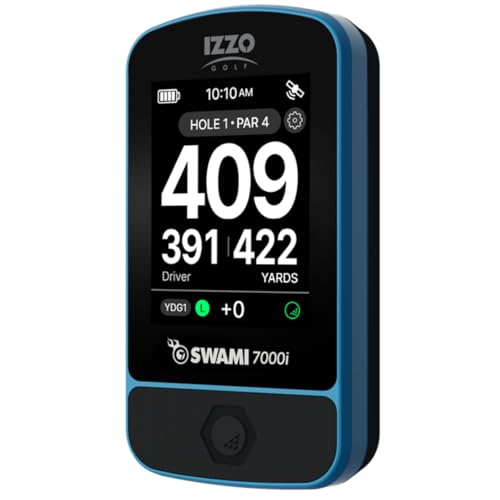
- ✓ Bright, easy-to-read display
- ✓ Intuitive touch controls
- ✓ Preloaded with thousands of courses
- ✕ Slightly bulky size
- ✕ Limited customization options
| Display | 2.5-inch color touchscreen with multiple color themes (Yellow, Blue, White) |
| Course Database | Preloaded with over 38,000 worldwide courses |
| Distance Measurement Accuracy | Front, center, and back of green; layup and hazard distances |
| Battery Life | Up to 16 hours in GPS mode |
| Connectivity | Rechargeable via USB-C port |
| Durability | Water-resistant with internal magnets for cart mounting |
You’re standing on the tee box, squinting at your old GPS watch that’s barely readable in the bright sun. The tiny screen makes it tough to see distances clearly, especially with your bad eyesight.
That’s when you finally switch over to the Izzo Swami 7000i, and instantly, you notice how bright and bold the 2.5-inch color touchscreen is.
The large display is a game-changer. With its vivid colors and adjustable themes, it’s easy to pick out the information you need without straining.
The touch controls are smooth and responsive, so navigating between distances and courses feels effortless. You can swipe, tap, and access features quickly—perfect when you’re on the move or in a hurry.
One of the best parts is how clear the distances are. The front, center, and back of the green are displayed prominently.
Hazards and doglegs are easily visible, helping you plan smarter shots without squinting or guessing. The built-in digital scorecard keeps everything organized, and the auto-hole advance means you don’t have to fuss with buttons during your round.
Loaded with over 38,000 courses worldwide, it’s ready to go right out of the box. No downloads, updates, or subscriptions needed, which is a relief.
The sturdy, water-resistant design and powerful rechargeable battery—lasting up to 16 hours—mean you can rely on it all day long without worry.
Overall, this GPS makes a noticeable difference for anyone with vision challenges. It’s simple, bright, and smart, making your game more enjoyable and less frustrating.
Whether you’re carting around or walking the course, it’s a reliable companion that truly enhances your play.
Blue Tees Golf Player+ GPS Speaker with Touchscreen

- ✓ Bright, easy-to-read touchscreen
- ✓ Waterproof and durable
- ✓ Long battery life
- ✕ Slightly bulky for small hands
- ✕ Higher price point
| Display | Touchscreen with high visibility for easy navigation |
| Battery Life | Over 10 hours of continuous use |
| Water Resistance | IPX7 waterproof rating |
| Range | Effective connectivity up to 100 feet |
| Distance Measurement Features | Visual and audible distances to front, center, and back of green; driving distance; dynamic hazards |
| Additional Features | Magnetic attachment, power bank functionality, scorekeeping, links with other devices |
Imagine you’re on the course, and the sun is shining brightly, making it hard to see small details on your GPS device. You reach into your bag and pull out the Blue Tees Golf Player+ GPS Speaker.
The first thing you notice is its large, vibrant touchscreen—easy to read even under bright sunlight.
Holding it in your hand, you feel the sturdy magnetic strip, perfect for attaching it to your golf cart or clubs. It’s lightweight but feels solid, and the high-quality touchscreen responds smoothly with just a tap.
Navigating through distances, hazards, and scorekeeping is effortless, thanks to its intuitive interface.
The visual and audible distances help you make smarter shot decisions without squinting or trying to focus too hard. Plus, the device’s waterproof design means you won’t worry about rain or splashes ruining it.
The deep bass audio makes listening to music or game updates enjoyable, even in noisy environments.
With over 10 hours of battery life, you can comfortably play multiple rounds without recharging. And if your phone needs juice, the built-in power bank feature has you covered.
The 100-foot range keeps you connected, giving you flexibility to move around or stay in touch with your group.
Overall, this GPS speaker combines practicality with fun, making it a great companion for golfers with bad vision or anyone needing a clear, easy-to-use device on the course.
What Features Make Golf GPS Devices Ideal for Individuals with Bad Vision?
The best golf GPS devices for individuals with bad vision incorporate several key features to enhance usability and accessibility on the course.
- Large Display: A larger screen size ensures that information is easier to read, allowing users to see distances, hazards, and course layouts without straining their eyes.
- High Contrast and Color Options: Devices that offer high-contrast displays or customizable color schemes can significantly improve visibility in various lighting conditions, making it easier for users to distinguish between different features on the course.
- Voice Guidance: Voice prompts provide audible distance information and guidance without requiring the user to look at the screen, thus allowing individuals with visual impairments to stay focused on their game.
- Simple User Interface: An intuitive, simplified interface reduces the complexity of navigation, allowing users to access necessary information quickly and with minimal confusion.
- Zoom Functionality: Some devices offer a zoom feature that allows users to enlarge specific portions of the map or hole layout, giving them a closer look at key areas to enhance their understanding of the course.
- Accessibility Features: Features like tactile buttons or haptic feedback can aid users with vision impairments, providing physical cues that enhance their interaction with the device.
Having a large display helps in reducing eye strain, while high contrast and color options cater to individual preferences and lighting scenarios. Voice guidance eliminates the need for constant attention to the screen, allowing users to maintain their focus on their game. A simple user interface minimizes distractions, while zoom functionality allows for detailed examination of crucial course elements. Finally, accessibility features ensure that all users can effectively operate the device regardless of their visual capabilities.
How Does Screen Size Influence the Usability of Golf GPS for Visually Impaired Golfers?
Screen size plays a crucial role in the usability of golf GPS devices for visually impaired golfers. A larger display can significantly enhance accessibility and user experience. Here’s how screen size influences usability:
-
Visibility: Larger screens provide better visibility for individuals with impaired vision. Bigger text and larger buttons can facilitate easier navigation and interaction with the device.
-
Clarity: High-resolution screens can display detailed maps and graphics, which are essential for golfers needing to read distances or course layouts clearly.
-
Ease of use: A more expansive screen allows for a more intuitive interface.Golf GPS units with touch functionality benefit from larger screens, making it easier to tap on specific areas or functions without frustration.
-
Contrast and color options: Devices that offer screen size combined with adjustable brightness and color settings can help visually impaired users customize the display to their preference, improving readability.
-
Information layout: Larger screens can present information more clearly, reducing clutter and enhancing navigation through menus, helping golfers find the data they need quickly.
Selecting a golf GPS with a larger screen can markedly enhance the game experience for those with visual impairments, offering better usability and confidence on the course.
In What Ways Do Voice Commands Enhance the Golf GPS Experience for Users with Visual Impairments?
Voice commands significantly enhance the golf GPS experience for users with visual impairments through various functional improvements.
- Hands-Free Operation: Voice commands allow users to interact with their golf GPS devices without needing to touch screens or buttons. This is particularly useful on the golf course where users may be holding clubs or walking, providing a seamless and safe way to receive information.
- Audio Distance Measurements: Many golf GPS devices equipped with voice command features can provide audio feedback on distances to hazards, greens, and fairways. This auditory information helps visually impaired players make informed decisions about their shots without needing to visually consult the device.
- Navigation Assistance: Voice commands can guide users through the golf course by providing turn-by-turn navigation. This helps players remain oriented, reducing the risk of getting lost and allowing them to focus on their gameplay rather than navigation.
- Course Information Access: Users can ask their devices for information about the course layout, including hole descriptions and suggested club recommendations. This enhances the overall understanding of the course and aids in strategic planning for each hole.
- Customizable Settings: Voice command features often include customizable options that allow users to adjust the types of information they receive and how it’s delivered. This personalization ensures that players can tailor their experience to best suit their needs, enhancing usability and enjoyment.
What Are the Top-Recommended Golf GPS Models for Golfers with Bad Vision?
The top-recommended golf GPS models for golfers with bad vision prioritize features like large displays, voice guidance, and high contrast visuals.
- Garmin Approach G80: This handheld GPS features a large, sunlight-readable display, making it easier for those with vision impairments to see yardage information clearly. Additionally, it offers a built-in launch monitor for swing analysis, which can be beneficial for improving game performance.
- SkyCaddie SX500: With its 5-inch touchscreen, the SX500 is known for its vibrant color display and intuitive interface, enhancing visibility for players with poor eyesight. It also features audio distance calls, allowing golfers to receive verbal updates on distances to hazards and greens without straining their eyes.
- Bushnell Neo iON 2: This GPS watch has a large, easy-to-read display and provides critical information right on the wrist, eliminating the need to look down at a handheld device. It also includes a long battery life and over 36,000 preloaded courses, making it a convenient option for golfers who prefer simplicity and clarity.
- Garmin Approach S62: Another watch option, the S62 features a bright color touchscreen and customizable watch faces that can enhance visibility for users with vision difficulties. It includes additional features like virtual caddy suggestions and hazard views, all accessible with a simple tap or swipe.
- Voice Caddie VC300: This model combines a compact design with voice output, providing golfers with audible distance measurements, which is especially helpful for those who struggle to read screens. The simplicity of operation ensures that users can focus on their game without worrying about visual strain.
How Do User Experiences Reflect the Effectiveness of Golf GPS Devices for Visual Impairments?
User experiences highlight several key factors that determine the effectiveness of golf GPS devices for individuals with visual impairments.
- Audio Features: Golf GPS devices equipped with audio capabilities allow users to receive verbal distance measurements and course information, significantly enhancing navigation on the course. These features enable visually impaired players to make informed decisions without needing to rely on visual cues.
- Vibration Alerts: Some devices offer vibration notifications to indicate hazards or distance markers, which can be particularly useful for users with limited or no vision. This tactile feedback provides an alternative way to perceive important information, allowing players to stay aware of their surroundings without visual input.
- User-Friendly Interfaces: The best golf GPS devices for bad vision often feature large, high-contrast buttons and simple navigation menus. An intuitive design reduces the learning curve and enables users to easily access essential functions, such as distance measurements and course maps, without frustration.
- Customizable Settings: Many devices allow users to customize audio prompts, vibration intensity, and display settings to suit their personal preferences. This adaptability is crucial for accommodating varying levels of visual impairment, ensuring that each user can tailor the device to meet their specific needs.
- Community Support and Reviews: User experiences shared in forums and reviews provide valuable insights into how effective various golf GPS devices are for individuals with visual impairments. Feedback from the visually impaired community can guide potential buyers to the most suitable options based on real-life experiences and challenges faced on the golf course.
What Role Do Customization Options Play in Golf GPS Devices for Golfers with Bad Vision?
Customization options significantly enhance the usability of golf GPS devices for golfers with bad vision, allowing them to tailor the device to their specific needs.
- Font Size Adjustment: Many golf GPS devices offer the ability to increase font sizes, making it easier for visually impaired golfers to read important information such as distance to the hole or course layout.
- Color Contrast Settings: Customization options often include adjusting color schemes to improve visibility against the course background, which can help golfers with color blindness or low contrast sensitivity.
- Audio Features: Some devices come with voice prompts that can provide distance readings and course information audibly, allowing golfers with poor vision to receive crucial data without needing to look at the screen.
- Touchscreen Sensitivity: Devices may allow users to adjust the touchscreen sensitivity, enabling easier navigation for those who might struggle with fine motor skills or precision due to visual limitations.
- Custom Alerts: Golf GPS devices may feature customizable alerts for hazards or distance milestones, providing auditory or vibration feedback that can assist golfers in staying informed on the course without relying solely on visual cues.
- Map Customization: Some advanced models allow users to modify the map display, such as highlighting specific areas or marking personal notes, helping visually impaired golfers to better understand their surroundings and plan their shots.